Mobile Detailing
Without the Paperwork
Trackara Pro was built for mobile mechanics, but the workflow is almost identical to mobile detailing, and a lot of detailers already use it. Online booking, on-site invoicing, before/after photos, client & vehicle records, route planning, and tax-ready expense logs. From the driveway to the invoice, all from your phone.
Running a Detail Business From Texts and Notes
Every mobile detailer eventually hits the same wall, the back-office work eats more time than the actual detailing.
Booking by Text Tag
Customers DM you on Instagram, text from a referral, or message Facebook. By Friday your booking history lives across six apps and you're double-booked twice.
Invoicing on the Drive Home
You finish the job at 6pm but the invoice doesn't go out until you're back home typing it into a spreadsheet. Half the time you forget the upcharges, wheel cleaner, leather conditioner, that extra hour on the interior.
Photos Scattered Everywhere
Before/after shots are critical for paint correction and big interiors. But they live in your camera roll, mixed with everything else, and no one can find them when a customer claims you missed a spot.
The Whole Business in One App
Every part of running a mobile detail operation, bookings, quotes, invoicing, customer records, before/after photos, payment, taxes, in a single iPhone or Android app. Use it solo, or run a team of detailers on the same account.
Free Online Booking Page
Every account gets a free yourname.trackara.app page where customers pick a service and book. The booking lands in your schedule with the customer + vehicle pre-filled. No more DM tag.
Customizable Service Library
Load your detailing packages, full interior, exterior wash, paint correction, ceramic coating, headlight restoration. Insert into a quote or invoice in two taps. Price + duration built in.
Before / After Photos per Job
Snap photos directly inside the job. They attach to the customer's vehicle and ride along on the invoice. Critical when a customer questions condition or you want a portfolio for socials.
Route Planning Between Stops
Trackara figures out the optimal driving order for the day. One less hour in traffic = one more car detailed.
Invoice Before You Pack Up
Build the invoice in two minutes while you're still wiping the dash. Customer gets it by text or email with a payment link, many pay before you back out of the driveway.
Quotes & E-Signature
For ceramic coating, paint correction, or any multi-day job: build a line-item quote, send for digital signature, and convert to a work order with one tap once it's accepted.
Client & Vehicle Records
Every customer has a profile with their car(s), full job history, paint condition notes, what wax/coating you applied, and when. Show up to year-two customers already knowing the car.
Automatic Mileage + Expenses
Trackara logs the miles between every job for IRS deduction. Plus expense tracking for supplies (towels, chemicals, fuel), tax season takes minutes instead of weekends.
Profit per Job, Per Month
See real revenue, expenses, and profit margin in real time. Which packages make the most money? Which weeks are slow? Your dashboard answers it without spreadsheets.
Open the App, See the Whole Day
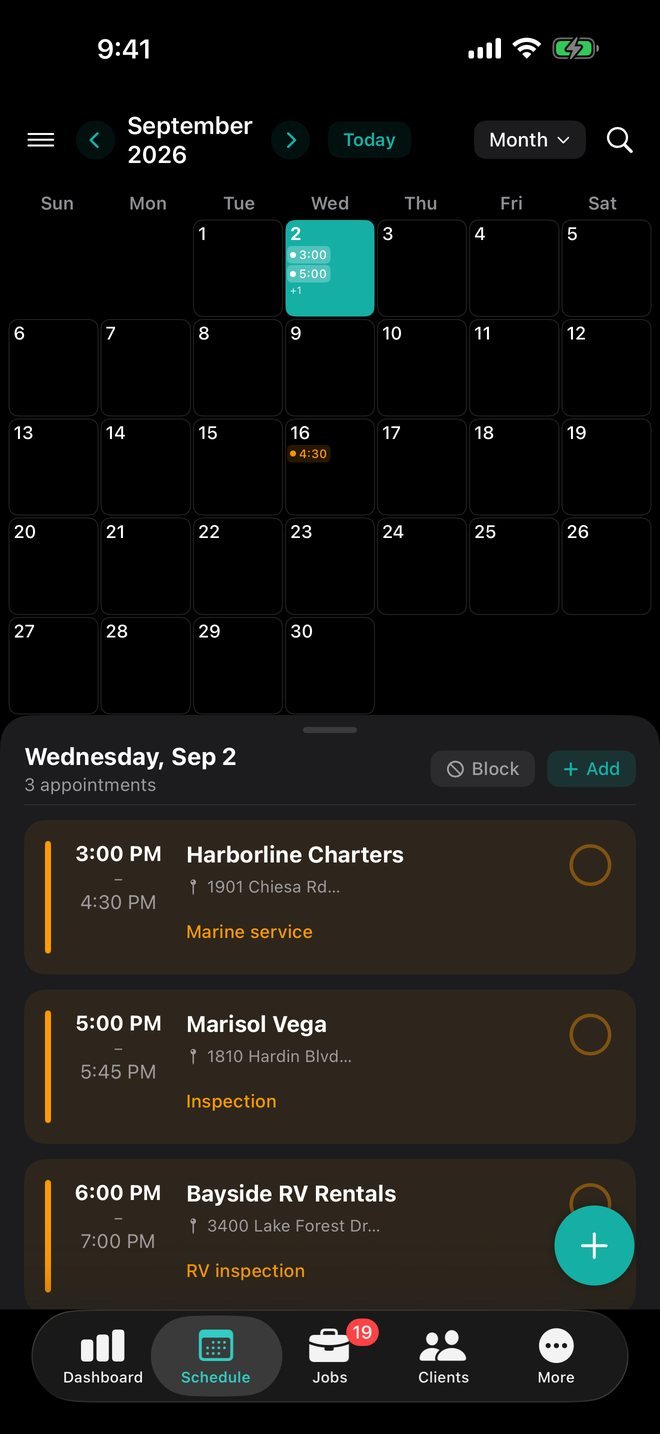
Wake up, open Trackara. You see every appointment, the optimal driving order, the client + vehicle for each one, what package they booked, and what notes you left last time.
No scrolling through texts to figure out who's first. No calling customers to confirm what package they wanted. You start the van already prepared for every stop.
3 details booked. Route planned. Photos ready.
Full Interior Detail, Mike Johnson
2019 Honda Civic · 1425 Oak St
Paint Correction (Stage 1), Sarah Williams
2021 Toyota Camry · 890 Elm Ave
Exterior Wash + Wax, James Carter
2017 Ford F-150 · 2200 Pine Rd
Same Features Mechanics Love, Used Detailer-Style
Online Booking
Your free yourname.trackara.app page. Customers pick a detailing package, choose a time, and book.
Learn moreOn-Site Invoicing
Build & send the invoice with a payment link before you leave the customer's driveway.
Learn moreQuotes for Big Jobs
Line-item quotes for paint correction, ceramic coating, multi-day projects. Digital signature included.
Learn moreMileage & Tax
Automatic mileage tracking between jobs + expense logging. Tax-ready reports come February.
Learn moreSpend Your Day Detailing Cars, Not Paperwork
Free 14-day trial. No charge until day 15. Cancel anytime. Works on iPhone, iPad, Android, and in any web browser via the included shop.trackara.app portal.
Detailer FAQ
Common questions from mobile auto detailers
Is Trackara Pro really built for mobile auto detailers?
The app was originally built for mobile mechanics, and the day-to-day workflow is almost identical to mobile detailing: on-site service, client + vehicle records, scheduling and route planning, before/after photos, quotes for big jobs like paint correction or ceramic coating, and on-the-spot invoicing. The Service Library is fully customizable, load it with your own detailing packages instead of the default mechanic services.
Can I take before/after photos and attach them to the customer's job?
Yes. Photos attach to each job and inspection, stored against the client + vehicle, and ride along on the invoice. Critical for proving condition before paint correction or interior shampoo work, and for building a portfolio.
Does it handle quotes for big jobs like ceramic coating or paint correction?
Yes. Build line-item quotes with labor, products, and add-ons, then send for digital signature. Once accepted, the quote converts to a work order with one tap so nothing gets re-typed.
Does Trackara Pro track mileage between detail jobs for taxes?
Yes, automatic mileage tracking between jobs, plus expense logging and tax-ready reports. Mobile detailers claim the same vehicle deductions as mobile mechanics.
Can customers book a detail online?
Yes. Every business gets a free online booking page (yourname.trackara.app) where customers pick a service, choose a time slot, and book in. The booking lands directly in your schedule.
How much does it cost?
14-day free trial. After that, $49.99/month or $499.99/year (about $41.67/month, 2 months free). Cancel anytime. Web portal included at no extra cost. Full pricing →