Auto Repair Scheduling Software
for Small and Mobile Shops
Trackara Pro is auto shop scheduling software for small, independent and mobile repair shops. Book jobs on a real repair calendar, let customers book themselves online, get reminded before every appointment, and plan the day's route, all from your phone, tablet or browser.
Every appointment is tied to the customer, the vehicle and its service history, and turns into a work order and an invoice when the job is done. $49.99/month with every feature included.
14-day free trial with full access. No charge until day 15. iPhone, iPad, Android and web.
Running Your Schedule From Memory Is Costing You Jobs
Whether you work out of a van or a two-bay shop, here's what it looks like when the schedule lives in your head, your texts, and a paper calendar.
Double-Booking Jobs
You told two customers the same time slot because nothing warned you. Now somebody's waiting, you're rushing, and both jobs suffer. One of them won't call back.
Forgetting a Customer
A customer booked last week but it never got written down. They're waiting while you're on the other side of town. That's a lost customer, and a bad review.
Phone Tag to Book One Job
Year, make, model, address, a good time. Three texts to book one oil change, answered with greasy hands. Meanwhile the customer who wanted to book at 9pm called someone else.
Automotive Scheduling Software Built Around Repair Jobs
Not a generic calendar app. A schedule built around jobs, customers, vehicles and technicians, and the way a repair day actually runs.
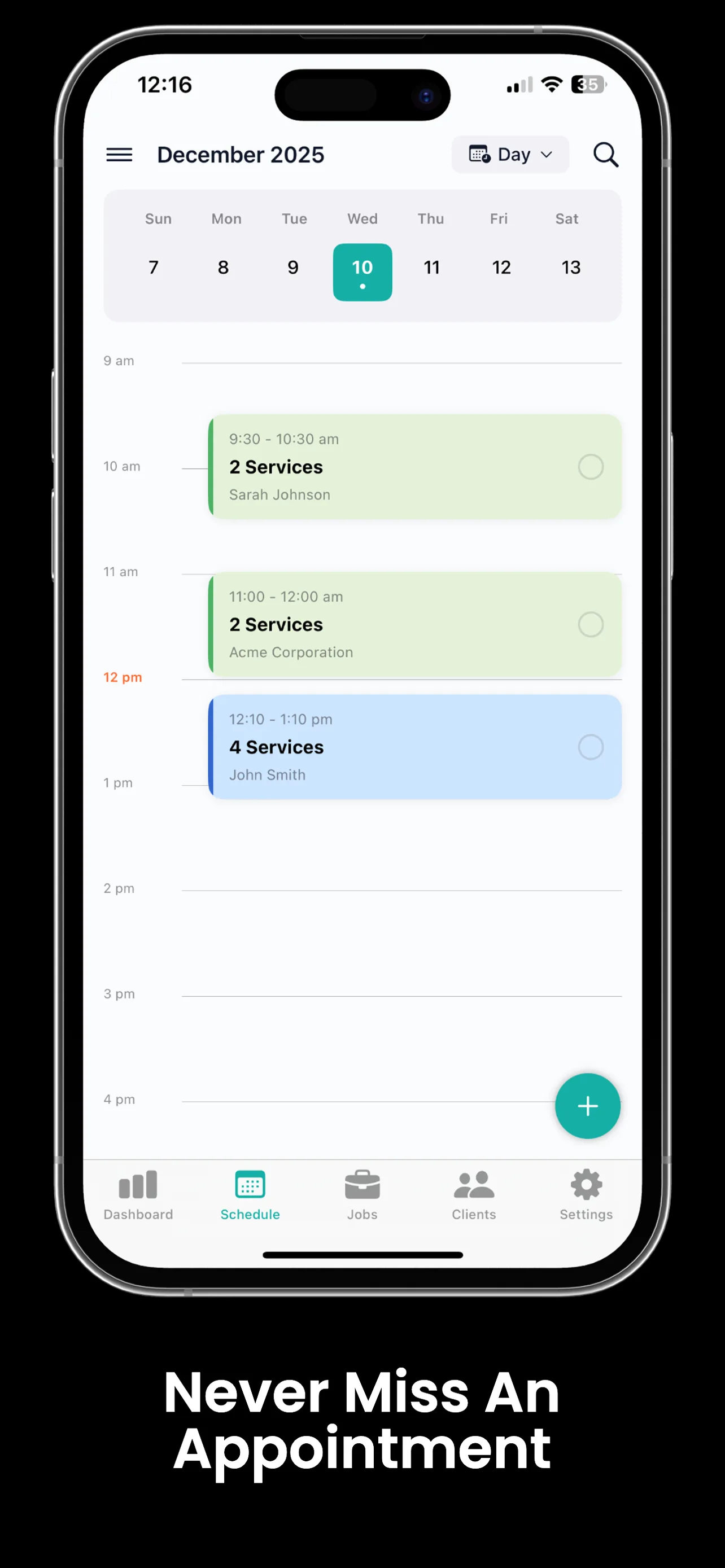
Day, Week & Month Views
Zoom in on today's jobs or out to see how the month is shaping up. Color-coded appointments show job type and status at a glance.
Service on Every Appointment
Pick the service when you book: oil change, brake job, diagnostic. It stays attached to the appointment so you know exactly what you're walking into.
Customer & Vehicle Linked
Tap an appointment to see the customer's phone number, the vehicle's year, make and model, and its full service history with you.
Double-Booking Warnings
Add a job that overlaps another and the app warns you before it saves. Pick a new time, or save anyway when you really mean to stack two jobs.
Assign to a Technician
Running a small crew? Assign each appointment to a technician from your roster. Technicians you assign work to are free; a technician who needs their own app login is a $15/month seat.
Phone Calendar Sync
Sync appointments to your iPhone or Android calendar so repair jobs sit alongside personal plans and nothing overlaps.
Appointment to Invoice
Turn a booked appointment into a work order and then an invoice without typing the customer, vehicle or services again.
Maintenance Reminders
Track service intervals by mileage and time for every vehicle. When a customer is due, Trackara Pro reminds you so you can book the next visit.
On the Web Portal Too
The same schedule is in the Trackara Pro web portal, included with every subscription, for whoever runs the desk or plans the week on a bigger screen.
Automotive Appointment Scheduling Your Customers Do Themselves
Every account includes a booking page at booking.trackara.app/your-shop. Put it in your Google listing, your Instagram bio and your text-back template, and let customers book while you're under a vehicle.
- Your real service menu. Customers pick from the services you offer, with your starting prices.
- Only open times. Customers see slots that match your schedule, and a slot locks the moment someone books it.
- Vehicle and contact captured. Year, make, model, name, phone and address arrive with the request.
- Optional deposit. Require a deposit at booking, paid online through your connected Square account or through the payment options you already use.
- You approve every booking. Requests land in your app to accept or decline. Accepted bookings create the client, the vehicle and the appointment for you.
Appointment Reminders That Keep You in Control
Choose how many hours before each appointment you want a reminder. When it fires, one tap opens a text or email to the customer using your own confirmation template, sent from your own number and inbox.
Nothing goes out to a customer automatically. You tap Send, so a rescheduled or cancelled job never gets a stale reminder. Flag no-show-prone customers to get reminded more often.
Want to know what no-shows really cost you? Try the free no-show cost calculator.
From Booked Schedule to Planned Route
For mobile work, the schedule is only half the job. Hit Plan My Day and the route optimizer reorders today's appointments to cut drive time.
3 jobs booked. All client info one tap away.
Oil Change, Mike Johnson
2019 Honda Civic · 1425 Oak St
Brake Pads, Sarah Williams
2021 Toyota Camry · 890 Elm Ave · booked online
Diagnostic, James Carter
2017 Ford F-150 · 2200 Pine Rd
One Price, Every Feature, Scheduling Included
No feature tiers and no add-on for online booking. Scheduling, booking, invoicing, inspections and the rest are all in the same subscription.
Monthly
- Every feature included
- iPhone, iPad, Android and the web portal
- 14-day free trial, cancel anytime
Yearly
- Everything in Monthly
- Save $99.89 a year, about 2 months free
- 14-day free trial
Technicians you assign work to are free; a technician who needs their own app login is a $15/month seat.
Trackara Pro vs Typical Auto Shop Scheduling Software
Most repair shop scheduling software comes inside a full shop management system priced for multi-bay shops. Here's how the entry plans compare on scheduling.
| Trackara Pro | Shopmonkey (Basic) | Tekmetric (Start) | |
|---|---|---|---|
| Price, monthly billing | $49.99/mo, every feature | $239/mo | $199/mo |
| Annual option | $499.99/yr | $215/mo billed annually | $179/mo billed annually |
| Users | Techs you assign work to are free; $15/mo per tech who needs their own app login | 3 user licenses included, +$20/mo per additional user | Every user included; priced per shop, not per user |
| Online booking | Included | Part of the CRM Essentials add-on ($349/mo, or $314/mo annually) | Part of the Marketing add-on ($345/mo per shop) |
| Appointment reminders | Reminder to you before each job, with one-tap text or email to the customer (you tap Send) | Automated appointment reminders included | Automated reminders are part of the Marketing add-on |
| Route planning for mobile jobs | Route optimizer and day planner included | Not listed on pricing page | Not listed on pricing page |
| Free trial | 14 days, full access | Not listed on pricing page | Free demos, no free trial |
| Built for | Small, independent and mobile shops | Single-bay shops up to large franchises | Independent and multi-location shops |
Competitor details from shopmonkey.io/pricing and tekmetric.com/pricing, checked September 25, 2026. Prices change, so check each company's site for current rates. Shopmonkey and Tekmetric include tools Trackara Pro does not, such as bay and front-desk workflows for larger shops.
Want the long version? Read our mechanic scheduling software comparison, which also covers AutoLeap, Orderry and Google Calendar.
Built for Small, Independent and Mobile Shops
A great fit if you
- Run a mobile mechanic business out of a van or truck
- Own a small independent shop with one to five technicians
- Do diesel, fleet, RV or performance work and need a real calendar
- Want scheduling, booking, invoicing and mileage in one app you run from your phone
Probably not the right fit if you
- Run a large multi-bay shop that needs bay management
- Rely on service advisors and a front-desk workflow
- Need fully automatic customer text reminders with no tap from you
Scheduling Connects Your Entire Workflow
Online Booking Portal
Customers pick a service and an open time on your own booking page.
Learn moreRoute Optimizer
Turn today's appointments into the shortest drive, with parts runs dropped in.
Learn moreClient Management
Every appointment links to a client record with full vehicle and service history.
Learn moreMechanic Time Tracking
Start the clock when you arrive at a scheduled job and bill every minute.
Learn moreScheduling FAQ
Auto Repair Scheduling Software Questions
What is auto repair scheduling software?
Auto repair scheduling software is a calendar built around repair work instead of generic meetings. Every appointment carries the customer, the vehicle, the service being done and its history, and it turns into a work order and an invoice when the job is done. Trackara Pro adds an online booking page, appointment reminders and a route planner for jobs done on the road.
Is there free automotive scheduling software?
Trackara Pro is not free, but every account starts with a 14-day free trial with full access to every feature, and you are not charged until day 15. A free calendar such as Google Calendar can work for a few jobs a day, but it does not link appointments to vehicles, service history or invoices. Trackara Pro also offers free shop calculators, including a no-show cost calculator, at pro.trackara.app/tools.
Can customers book auto repair appointments online?
Yes. Every Trackara Pro account includes an online booking portal at booking.trackara.app/your-shop. Customers pick a service from your menu, enter their vehicle and contact details, and choose from times that match your real availability. The request lands in your app where you accept or decline it, and accepted bookings create the client, the vehicle and the appointment for you.
Does Trackara Pro send appointment reminders to customers?
Trackara Pro reminds you before each appointment, at the times you choose, with one-tap Text Customer and Email Customer buttons that use your own confirmation templates. Messages go out from your own phone number and email when you tap Send. Nothing is sent to a customer automatically, so you stay in control of every message.
How does Trackara Pro prevent double-booking?
When you add an appointment in the app that overlaps an existing one, Trackara Pro warns you before saving so you can pick another time or save anyway on purpose. On the online booking portal, customers only see open slots, and a slot locks as soon as someone books it.
Can I sync Trackara Pro with my phone calendar?
Yes. Appointments sync to your iPhone or iPad calendar, or to your Android or Google calendar, so repair jobs show up alongside the rest of your day.
How much does Trackara Pro scheduling software cost?
Scheduling is included in Trackara Pro at $49.99 per month or $499.99 per year, with every feature included and a 14-day free trial. Technicians you assign work to are free; a technician who needs their own app login is a $15/month seat.
Is Trackara Pro a good fit for a large multi-bay repair shop?
Trackara Pro is built for small, independent and mobile shops, typically one to five technicians. It does not do bay management or front-desk workflows for large multi-bay shops. If you run a 10-bay shop with service advisors, a full shop management system is likely a better fit.
Can I set maintenance reminders for repeat customers?
Yes. Trackara Pro tracks service intervals by mileage and by time for each vehicle and reminds you when a customer is due, so you can reach out and book their next appointment.
Try Auto Repair Scheduling Software Built for Your Size of Shop
Calendar, online booking, reminders and route planning, with every appointment tied to the customer, the vehicle and the invoice. Start your 14-day free trial today.